Kubernetes desktop tool

A lightweight Lens alternative
that lives in your menu bar

Want a lighter, native alternative to heavyweight Kubernetes desktop GUIs like Lens or OpenLens? Kubebar puts your clusters in the macOS menu bar and Windows system tray - cluster health, pod logs, restarts and scaling, without an Electron app or a sign-in.

14-day free trial · from 12 € a year · no account required

Why developers pick Kubebar

Native, not Electron. A tiny menu-bar / tray app that starts instantly and stays out of your way - no heavyweight desktop IDE.
No account, no login. Point it at your kubeconfig and go. Your cluster access never leaves your machine.
The essentials, one click away. Cluster health, live pod logs, restart pods, scale deployments, rollout restart/undo, cordon/drain nodes - with confirmations.
Every cloud. Azure AKS, AWS EKS, Google GKE, DigitalOcean DOKS and local clusters (Docker Desktop).
Optional AI - bring your own key. Explain logs, diagnose unhealthy pods and right-size resources with Anthropic, OpenAI or Ollama.
Billed yearly, not per seat. From 12 € a year - no monthly per-user subscription.

Kubebar vs. Lens

KubebarLens / OpenLens
FootprintMenu bar / tray, native, minimalLens: Electron desktop window
Always-on glanceCluster status in the menu barOpen the app first
Account requiredNoOften yes
PricingFree trial · from 12 €/yrLens: free to paid, depending on plan
PlatformsmacOS & WindowsVaries

Comparison reflects Kubebar's design focus; feature sets of other tools change over time - check their current docs.

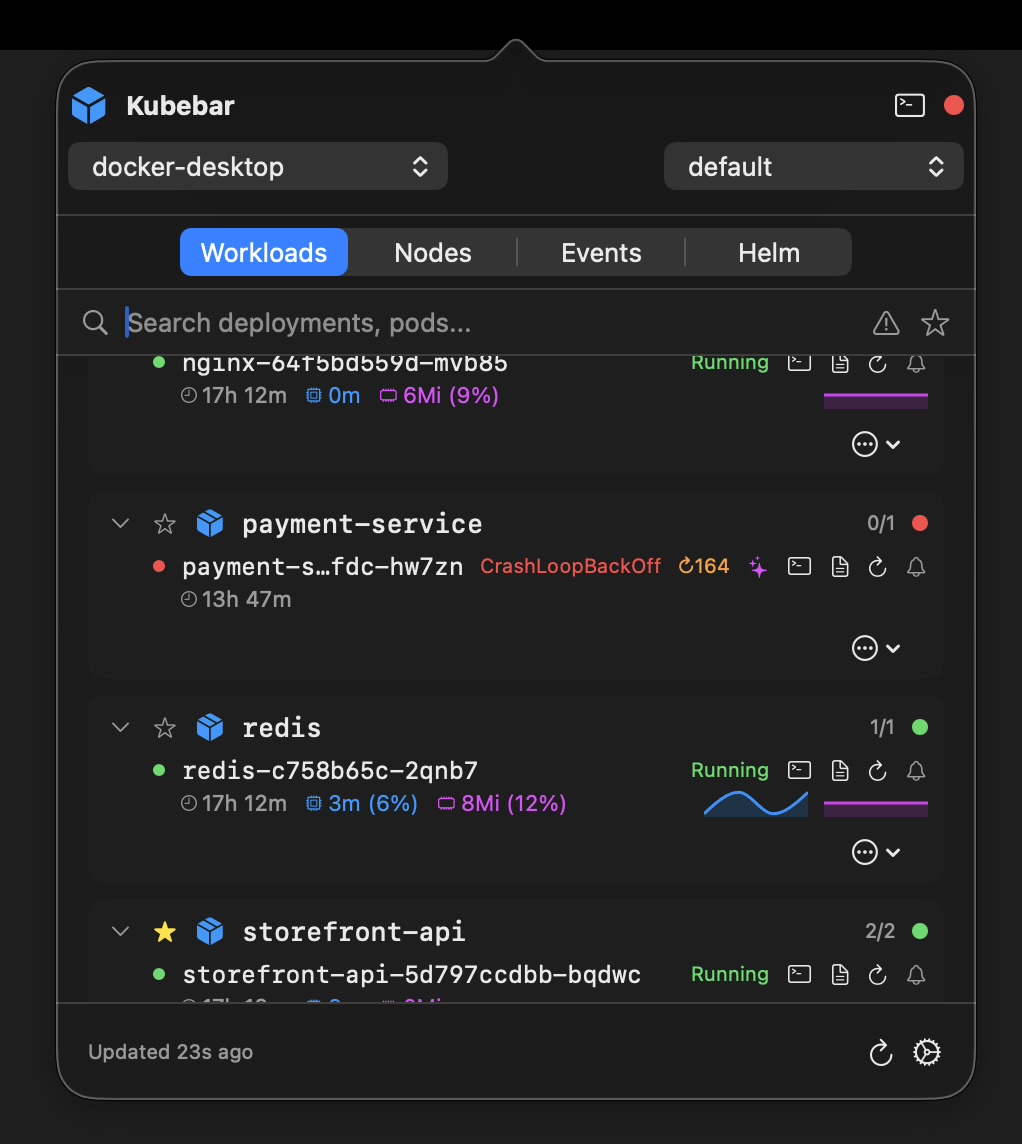
Kubebar cluster overview in the macOS menu bar
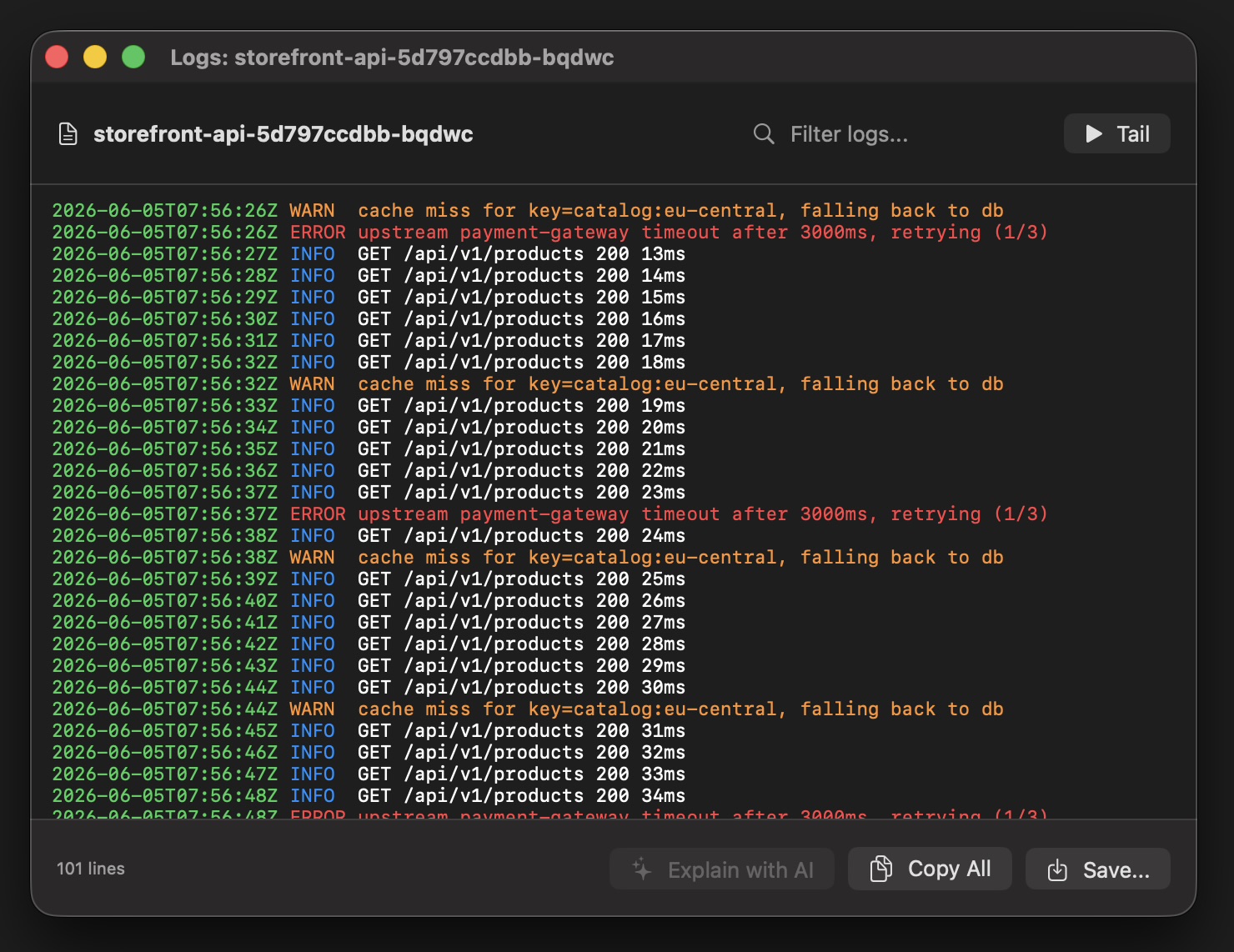
Live Kubernetes pod logs in Kubebar

Switch from Lens in three steps

  1. Point your kubeconfig at the cluster. Any cluster in your kubeconfig works — cloud (GKE, AKS, EKS, DOKS) or local (Docker Desktop, minikube, kind).
  2. Open Kubebar. It picks up every context automatically — no account and no cloud backend.
  3. Choose a context. Switch clusters and namespaces right from the menu bar or tray.

What you can do from the menu bar

Kubebar reuses the same kubeconfig Lens does, so there is nothing new to configure — just a much lighter window into your clusters.

Health at a glance. A status dot in the menu bar or tray turns red the moment a pod crashes or CPU and memory run high — with desktop alerts, so you notice without watching a dashboard.
Live pod logs. Stream logs from any pod in a real-time window, filter them, and copy or save exactly what you need.
One-click actions. Restart pods, scale deployments, roll out restart or undo, and cordon or drain nodes — each with a confirmation step so nothing happens by accident.
Switch clusters instantly. Every context from your kubeconfig is one click away; jump between clusters and namespaces straight from the menu bar.
Multi-cloud in one app. Manage GKE, AKS, EKS, DigitalOcean and local clusters like Docker Desktop, minikube and kind side by side.
Native and private. No account and no cloud backend — your credentials and kubeconfig never leave your machine.

Why choose Kubebar over Lens or OpenLens?

Desktop GUIs like Lens or OpenLens are capable but heavy: an Electron app that can use hundreds of megabytes of RAM and often wants a sign-in. Kubebar is a tiny native app that lives in the menu bar or tray, starts instantly, needs no account and covers the everyday essentials — health, logs, restarts and scaling — without the weight.

Try Kubebar instead

Free for 14 days. Then from 12 € a year.

Download Kubebar

Frequently Asked Questions

Is Kubebar a good Lens alternative?

Yes. It's a lightweight, native alternative to heavyweight desktop GUIs like Lens or OpenLens — no Electron app and no sign-in required.

How is Kubebar different from Lens?

Kubebar lives in the macOS menu bar or Windows tray with a tiny footprint, showing cluster health, pod logs, restarts and scaling, instead of a full Electron window.